A quiet countdown to the dates that matter
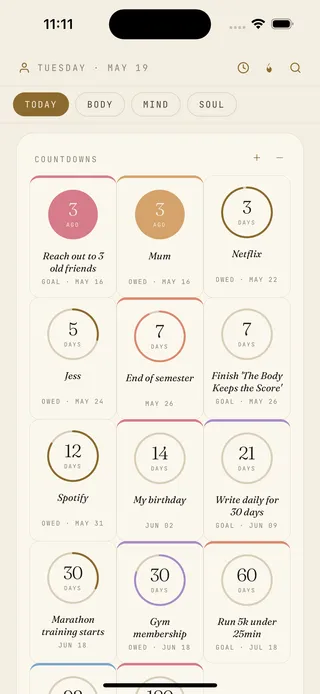
tadoy's countdowns are small circles for the dates you're walking toward — an event, a birthday, a deadline, the day a goal is due. They count down, and count up for the ones already past, and sit on the daily page next to everything else, not in a standalone countdown app.
What's in countdowns
- Days until — a calm circle to any date that matters: an event, a deadline, a birthday.
- Days since — the same circle, counting up, for the dates you want to keep in view.
- Pulled in automatically — goals, owed items and key dates surface as countdowns without re-entering them.
- A whole grid — every countdown in one quiet view, nearest first.
- Widget — the next date on the home or lock screen, off by default.
- Notifications — opt-in per countdown, editorial rather than pushy.
Not a novelty countdown app
tadoy's countdowns aren't a standalone widget toy. They're one card on the daily page, fed by the goals, owed items and dates you've already got — so the day you're counting toward sits next to the work, money and habits around it, not in an app you open once and forget.
How tadoy compares to countdown apps
Each of these does something tadoy doesn't and isn't trying to.
- Countdown+ / Dreamdays — dedicated countdown-widget apps with themes and photos. tadoy isn't competing on widget polish; it's a card inside the day.
- Days Until-style apps — single-purpose date counters. tadoy's counts are wired to your goals and owed items, not entered twice.
- Calendar / Reminders — own the event itself. tadoy answers "how long until" at a glance without opening the calendar.
Why it's on the daily page
A countdown is only useful next to what it changes — a deadline matters more when it's beside the goal it's for and the days you have left to move on it. That's why countdowns live on the Today page with everything else, not in a separate app you'd have to remember to check.
Privacy
Your dates and what they count toward live on your device — not synced to tadoy's servers, not used to train any model. The same on-device posture as journal, mood, body and habits. Full detail on the privacy page.
See the daily page Read about goals & habits
Common questions
- Is there a countdown widget?
- Yes — the next date on the home or lock screen, opt-in and off by default.
- Can it count days since, not just until?
- Yes. Future dates count down; past dates count up.
- Do I have to enter every date?
- No — goals, owed items and key dates become countdowns automatically. You can add standalone ones too.
- Is it a standalone app?
- No — one card on the daily page, fed by the rest of tadoy.
- Is the data private?
- Yes. On-device, not synced to our servers, not used for training.
- Does it work offline?
- Yes, fully — countdowns are local and need no connection.