A quiet digestion & bathroom log
tadoy's bathroom module is a small, private digestion tracker — bowel movements, Bristol stool scale, urgency, blood, useful for IBS, IBD and food-sensitivity work. It's off by default and never the headline of the app. When it's on, it sits quietly on the body page next to food, cycle and sleep.
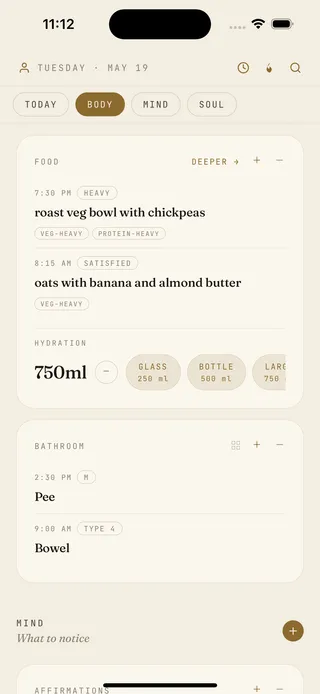
What's in the bathroom module
- Bowel movements — count, Bristol stool scale (1–7), one tap.
- Urgency, blood, mucus, pain — short tap-lists, optional.
- Free-text note — anything you want to remember.
- Urination tracking — count, urgency, optional, off by default.
- Trend view — patterns across the week and month.
- Body page integration — entries sit next to food, cycle, sleep, stress.
- Hide-on-tab — switch the whole module off if you'd rather not see it.
A log, not a clinical tool
Worth being explicit. tadoy's bathroom module is a tracker — it doesn't diagnose and isn't a clinical IBS/IBD workflow tool like Cara Care. Where it shines is the daily read: a quiet entry alongside everything else you logged, with digestion patterns visible next to food, cycle and stress without switching apps.
How tadoy compares to dedicated digestion apps
- Cara Care — the IBS/IBD specialist with clinical content and a structured flare workflow. tadoy is the lighter daily log that pairs alongside.
- Apple Health — Apple's symptom logging covers some digestion entries but not the Bristol scale or detailed bowel-movement counting. tadoy keeps its log on-device rather than routing it through Health.
We call this module "bathroom" because that's the word people actually use — easy to open, log and ignore, with the Bristol scale and clinical terms inside the entry, not on the tab.
Privacy
Bathroom and digestion entries live on your device — not synced to tadoy's servers, not used to train any model. The same on-device posture as journal, mood, body and habits. Full detail on the privacy page.
See the daily page Read about the food module
Common questions about the bathroom module
- Why would I track this?
- Usually because something's off — IBS, IBD, food sensitivities, a recent change in medication — and the daily log helps you spot patterns or bring evidence to a doctor.
- What can I log?
- Bowel movements with Bristol scale (1–7), urgency, blood, mucus, pain. Urination optional.
- Is it appropriate for IBS or IBD?
- Useful as a daily log. Not a clinical workflow tool — for that, look at Cara Care or talk to a gastroenterologist.
- Can I hide the module entirely?
- Yes. It's off by default. Turn it on if you want it; switch it off to remove the surface.
- Is the data private?
- On-device only. No server copy, no sharing, no training.